Connect a clean Ubuntu server and have Laravel, WordPress or any PHP app live in production in minutes. Hanoo handles runtimes, packages, domains, certificates and deploys — and if you ever stop using us, your apps keep running on a server that is entirely yours.
ubuntu@production-1: ~An example: connecting a server to Hanoo, then deploying an application to it.
$ curl -fsSL https://app.hanoo.io/api/v1/install.sh \ | sudo bash -s -- --url https://app.hanoo.io/api \ --token hne_••••••✓ Agent installed · outbound mTLS, no open port✓ production-1 approved in your dashboard# then, from the dashboard: an app and a domain✓ Laravel app shop · PHP 8.4 FPM pool running✓ Release 1 built and activated✓ shop.northwind.dev · certificate issued (Let's Encrypt)https://shop.northwind.dev is live
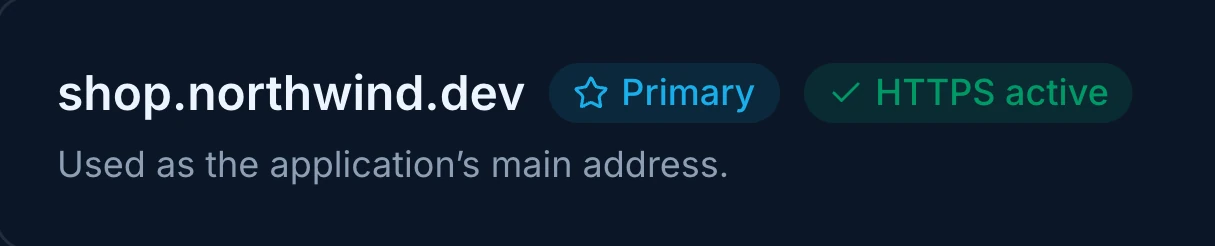
Shop · Domains live
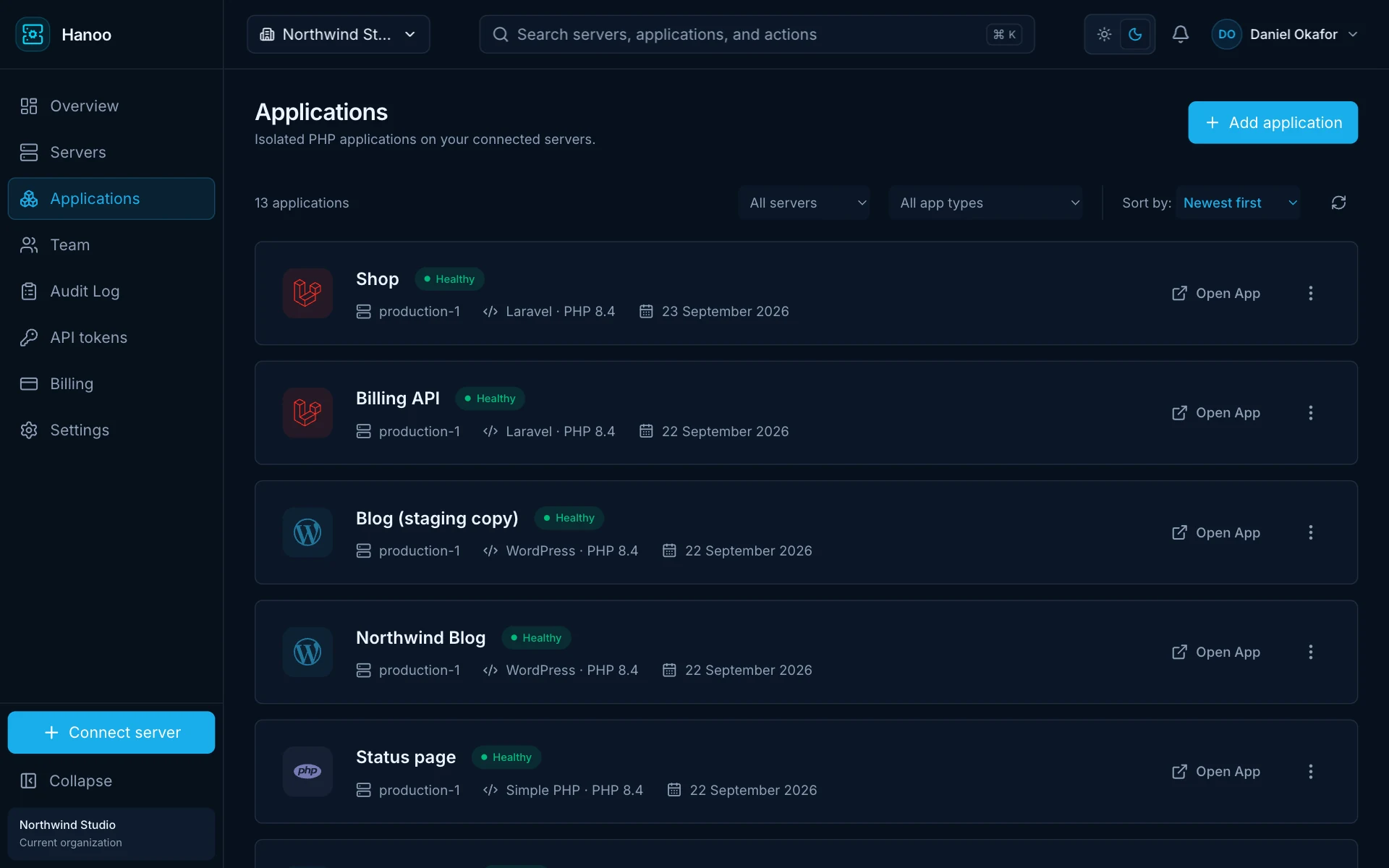
app.hanoo.io/applications
To connect a server
One command
Management ports opened
None
PHP versions, side by side
8.0 – 8.5
Deploys and rollbacks
Zero downtime
Built on the open-source stack you already trust
Ubuntu 22.04–26.04 LTS
Caddy
PHP 8.0–8.5
Composer
Node.js
MariaDB
Valkey
Let's Encrypt
How it works
From a blank server to HTTPS in three steps.
Bring a server from any provider. We turn it into a secure home for your PHP applications — and show you every step as it happens.
123
1
Connect a server
Paste one command on a fresh Ubuntu server from any provider. It installs a small agent that dials out to us — no inbound port, no root password shared.
ubuntu@server
One-time install command generated in your Hanoo dashboard
Token expires after 10 minutes · review server details before approval
2
Create an application
Pick Laravel, WordPress or plain PHP, or point at a GitHub, GitLab or Bitbucket repository. The server generates a read-only deploy key; its private half never leaves your machine.
hanoo
✓ Isolated user app_7f3c created
✓ PHP 8.4 FPM pool running
✓ Deploy key registered (read-only)
✓ Release 1 built and activated
3
Go live on your domain
Add your domain. We check that DNS points at your server, issue a trusted certificate, and switch the site over with zero downtime.
Your AI assistant can run your servers — only as far as you allow.
Hanoo has a built-in MCP server. Connect Claude, ChatGPT, Cursor or VS Code and ask about your servers in plain English, or let the assistant deploy and roll back for you. Every action goes through the same checks as the dashboard.
Works with
Claude Code
Claude
ChatGPT
Cursor
VS Code
Example conversation · your assistant, connected to Hanoo
Deploy the latest main of Shop and tell me when it is live.
list_applicationsShop · Laravel · production-1
deploy_applicationDeployment queued · main @ 9e42d7e
get_jobSucceeded · 4 pipeline steps · health check passed
Shop is live on commit 9e42d7e. Migrations ran before the switch and the queue workers were restarted afterwards.
Ask, don’t dig
Which servers are down? Why did the last deploy fail? Which apps are still on PHP 8.2? Answers come from live data, not a stale export.
Act with typed tools
Create apps, deploy, roll back and change settings through named tools. There is no shell, no delete and no way to read a secret.
Scoped, expiring access
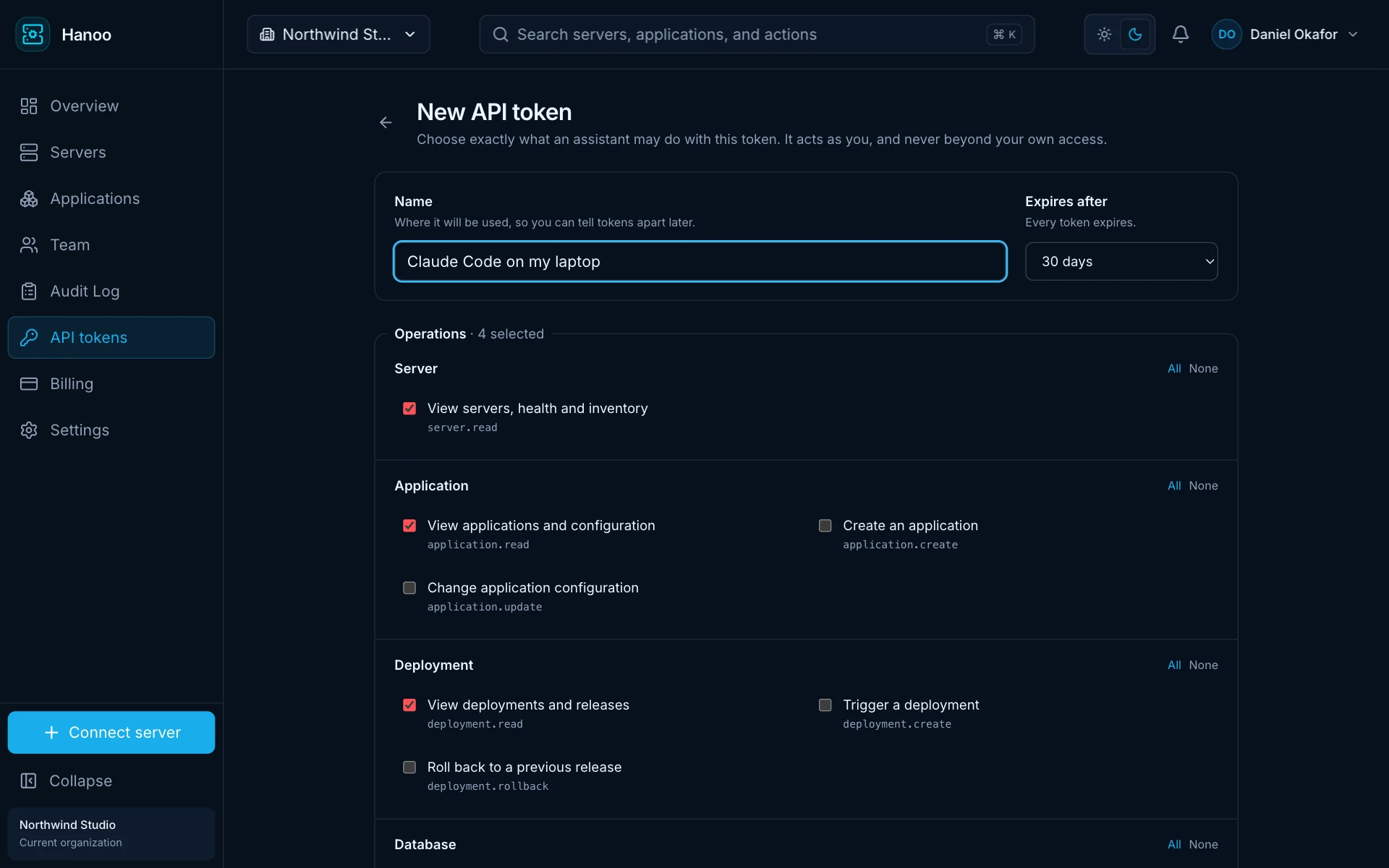
Sign in with OAuth or use a token that lists exactly which actions, servers and apps it covers. It expires, and you can revoke it in one click.
Every call is on record
Changes made by an assistant show up in the audit log with the token that made them, just like changes made by a person.
You choose what it may touch.
Each connection gets its own token. Reading is on by default; creating, deploying, rolling back and changing settings are separate boxes you tick. Limit it to a few servers or apps, and pick when it expires.
Every deploy is a new release. The live site is never half-built.
Hanoo builds each commit in its own release folder next to the one that is serving traffic. It switches over only when everything has passed, and puts the previous release back if the new one does not respond.
1
Pick a commit
Deploy the latest commit on a branch from GitHub, GitLab or Bitbucket — from the dashboard, the API or your AI assistant. Code is fetched with a read-only deploy key.
2
Build it on the side
Composer and your JavaScript package manager install dependencies and build assets in a new release folder. The live site keeps serving the whole time.
3
Run your pipeline
Migrations, storage links and caches run before go-live and can stop the deploy if they fail. Queue restarts and similar steps run after the switch.
4
Switch with no downtime
One atomic switch makes the new release live. No request ever lands on a half-copied folder.
5
Check it, or put it back
Hanoo calls the site right after the switch. If it does not answer, the previous release goes back automatically.
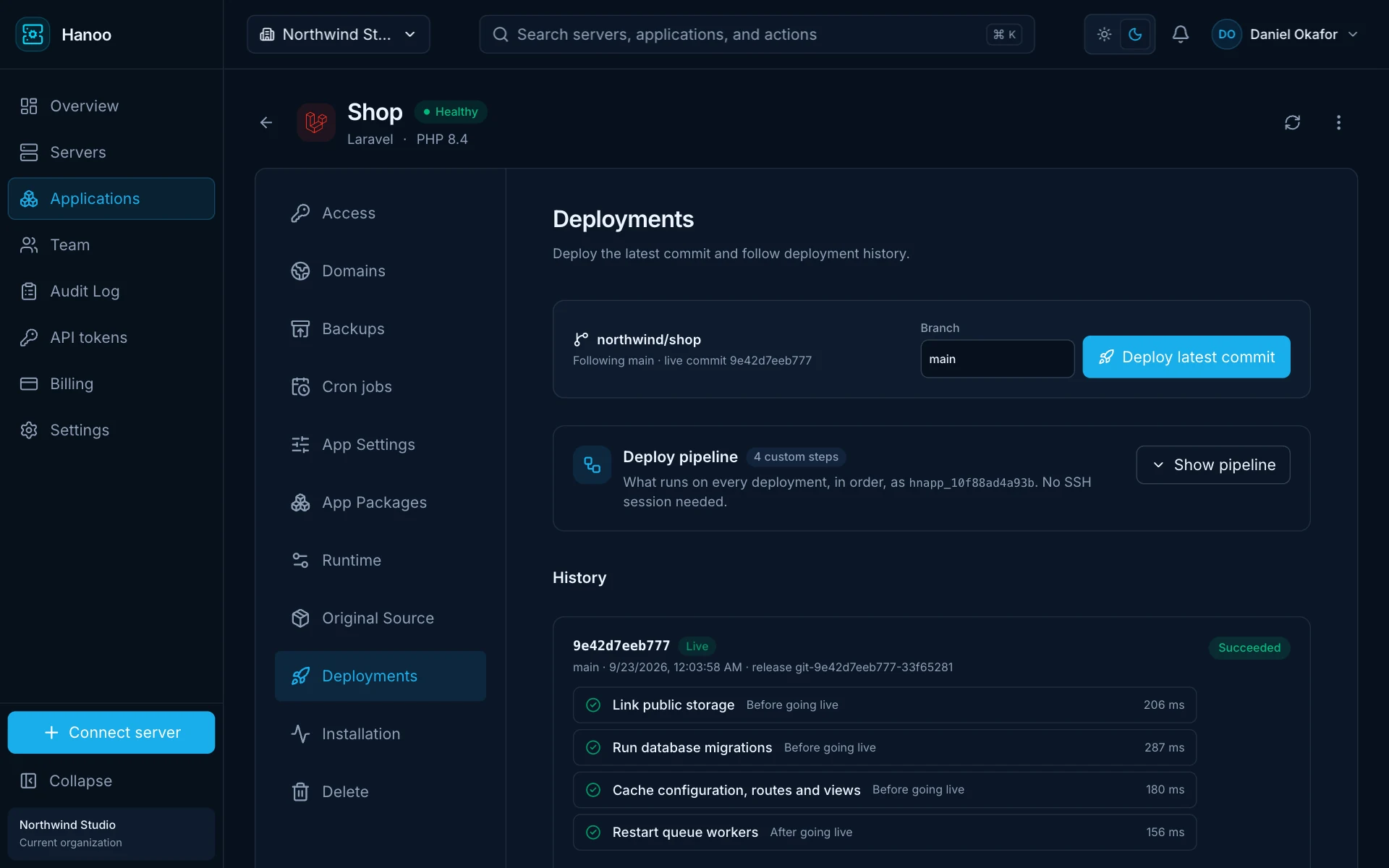
app.hanoo.io/applications/shop
One-click rollback
Earlier releases stay on the server. Rolling back is the same instant switch, with the same health check.
Every step, timed
Each deploy shows its steps, how long each took and the output of any that failed — no SSH needed.
Developer workflow
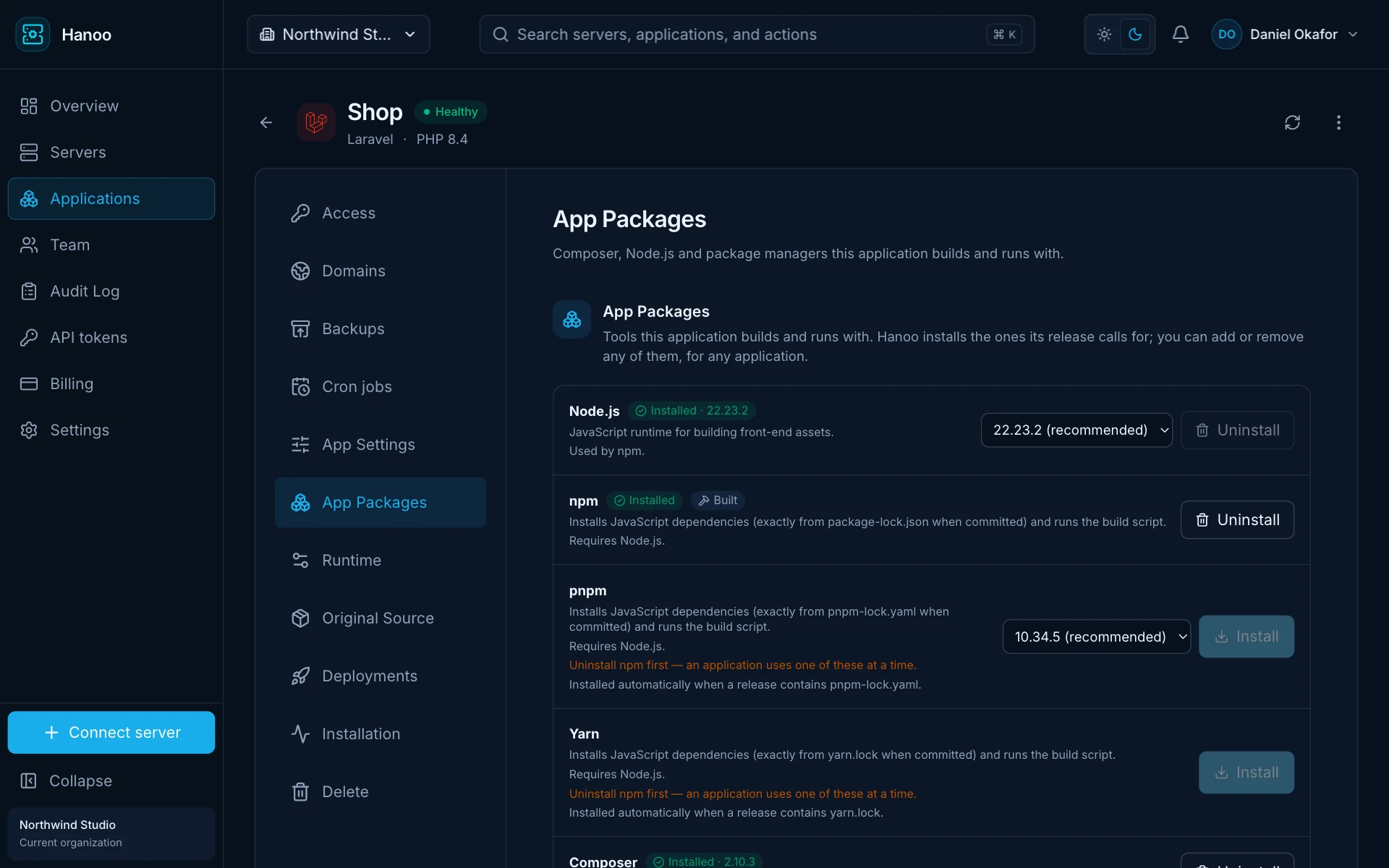
Composer, Node and builds — handled, and shown to you.
No more SSH-ing in to install the right Node version or wondering why a build failed. Hanoo reads your repository, installs exactly the toolchains it needs, and walks every deploy through visible, reversible steps.
1
Detected from your code
composer.lock means Composer. pnpm-lock.yaml, package-lock.json or yarn.lock pick the right JavaScript package manager.
2
Pinned and verified
Node.js 20, 22 and 24, npm, pnpm, Yarn and Composer are checksum-verified and shared across apps, then run as each app’s own user.
3
Builds before go-live
Dependencies install and assets build before a release is activated. A failed build never touches the running site.
app.hanoo.io/applications/shop
Inside the dashboard
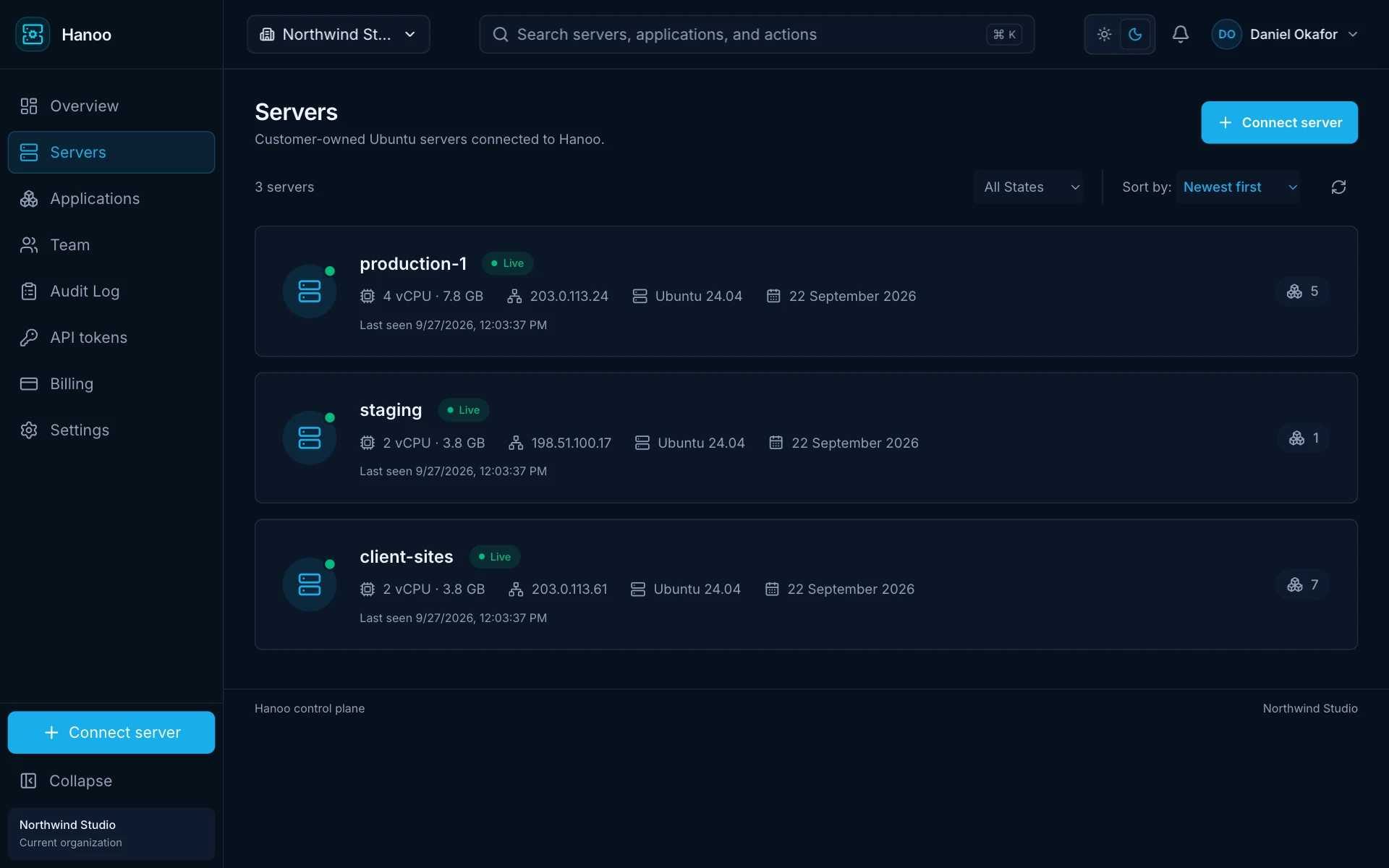
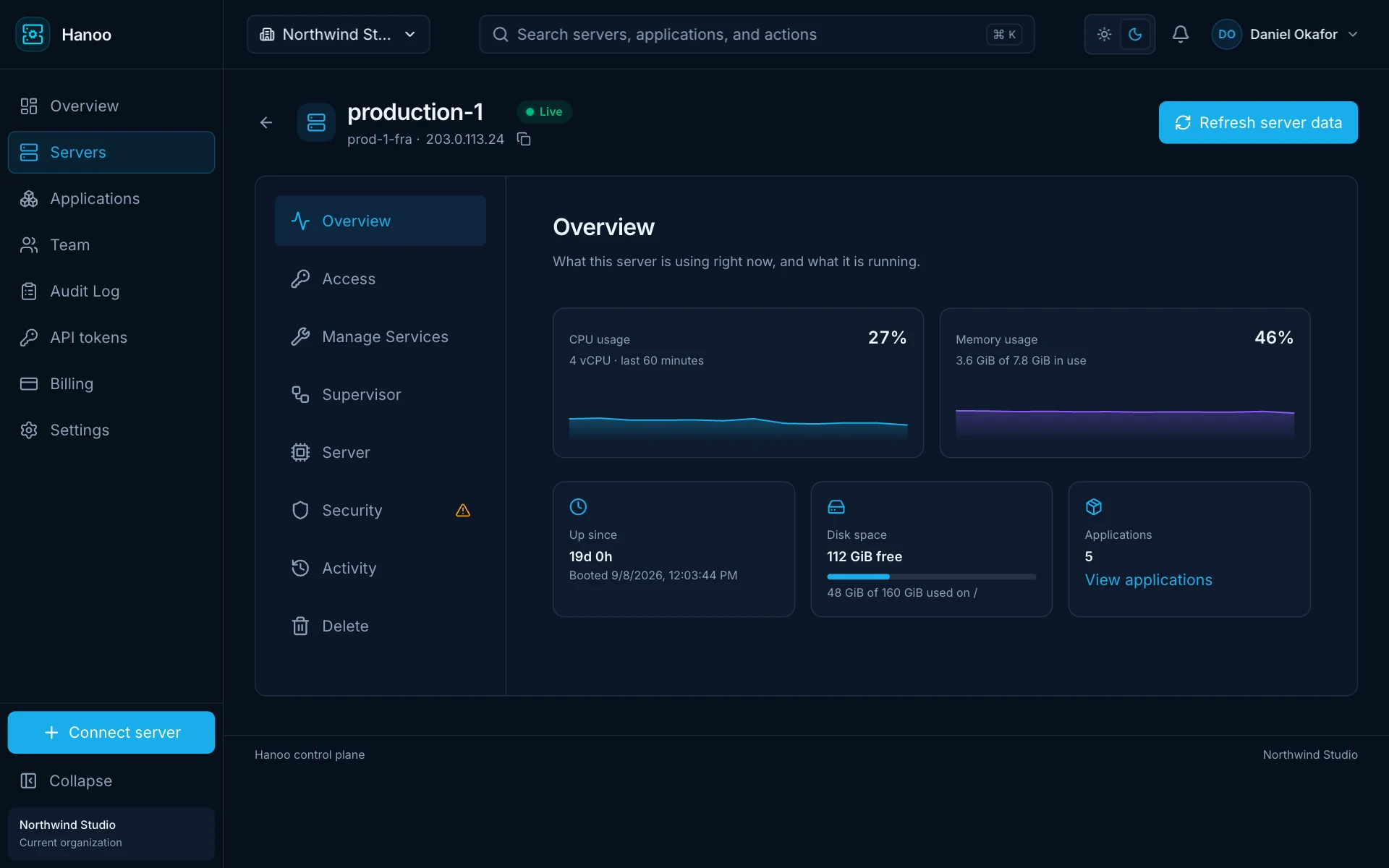
Every server, and how it is doing.
See which servers are online, what runs on each one and how busy it is — without logging in over SSH.
app.hanoo.io
Servers
Every connected server with its size, address, OS and number of apps.
app.hanoo.io
Server health
CPU and memory over the last hour, uptime, free disk space and the apps it hosts.
Fast by default
A modern stack, tuned for PHP from the edge in.
Caddy at the edge, a dedicated PHP-FPM pool per application behind it, and a worker-mode runtime for the apps that can take it.
Available
Caddy with built-in SSL
Caddy · Let’s Encrypt
A modern, memory-safe web server in front of every app. Certificates are issued and renewed automatically, HTTP redirects to HTTPS, and configuration changes reload without dropping a request.
Automatic HTTPS and renewals
HTTP/2 and compression out of the box
Last-known-good config if a change fails
Available
Blazing-fast WordPress
PHP-FPM · OPcache · Valkey
One-step WordPress with its own database and isolated PHP pool, served by Caddy with OPcache on — no shared-hosting neighbours eating your CPU.
OPcache and Caddy static-file serving
Dedicated database and PHP pool per site
Valkey object cache, one click to turn on
Coming soon
FrankenPHP Performance Runtime
Caddy + FrankenPHP workers
Boot your Laravel app once and keep it warm in persistent workers. Hanoo checks compatibility before it lets you switch, measures the difference on your own workload, and lets you go back to the standard runtime in one click.
Compatibility analysis before enabling
Measured on your traffic, not a benchmark
One-click switch back to PHP-FPM
Full control, no lock-in
Stop using us tomorrow. Your apps keep running.
Traditional panels expose a login page on every machine. Managed platforms keep your cloud account. Hanoo sits in between: a small agent on your server, a dashboard in the browser, and nothing you cannot walk away from.
Leave any time
Standard Ubuntu packages, standard Caddy and PHP-FPM, files where you expect them. Cancel, and every site keeps serving — you simply manage it yourself.
Full root access
It is your server in your cloud account. SSH in, change what you like, and bring your own tools. We never hold your root password.
Outbound only
The agent connects out over mutually authenticated TLS. There is no management port to open, scan or brute-force.
Your sites outlive us
Configuration lives on the server. If Hanoo is unreachable, your applications keep serving exactly as they were.
If the connection drops, your sites keep serving. Nothing inside the dashed line depends on us.
Batteries included
Everything a PHP application needs in production.
Sensible, secure defaults for Laravel, WordPress and plain PHP — with the underlying state always one click away.
Git deployments
Deploy any branch from GitHub, GitLab or Bitbucket with a server-generated read-only deploy key, and roll back to a previous release in one click.
Isolated applications
Every app gets its own Unix user and PHP-FPM pool. A compromised plugin in one app cannot read the files of another.
PHP 8.0 through 8.5
Run supported and explicitly acknowledged legacy PHP versions side by side, with isolated pools and honest lifecycle warnings.
MariaDB and Valkey
Install and harden managed database and cache services, with credentials generated on the server and kept out of your logs.
Cron jobs, readable
Presets, a visual builder or a raw expression — with plain-English schedules and the next run times shown before you save.
SSH access per app
Grant developers SSH keys scoped to a single application, and revoke them in one click.
Staging in a few clicks
Clone production into a staging copy on the same server or a different one — files, database and configuration — and the copy gets a database of its own.
Built for large teams
Set up a project for the whole team in minutes: invite people, grant each one only the servers, apps and actions they need, and see who did what, and when.
Typed operations only
Every change is a validated operation with progress, output and an actor — never an opaque remote shell.
Pricing
Simple pricing. Your servers, your bill.
Pay us for the software. Pay your provider for the server. No markup on infrastructure, ever.
A clean Ubuntu 22.04, 24.04 or 26.04 LTS server from any provider — DigitalOcean, Hetzner, AWS, Vultr, your own hardware — on amd64 or arm64. It needs outbound internet access; no inbound management port is required.
Do I keep root access to my server?
Yes. It is your server, in your cloud account. Hanoo never asks for your root password and never stores your SSH private keys.
Is the agent safe to run?
The agent only accepts signed, typed operations from the control plane over mutually authenticated TLS. There is no command that runs arbitrary shell, and every operation is attributed to the person who requested it.
What happens to my sites if Hanoo goes down?
Nothing. Configuration is applied on the server itself, so Caddy and PHP keep serving your applications whether or not the dashboard is reachable.
Can I still change things on the server by hand?
Yes. We use standard Ubuntu packages and standard configuration locations. Files Hanoo manages are clearly marked, and everything else is yours to change.
What happens if I stop using Hanoo?
Your servers and applications keep running, unchanged. Everything is standard Ubuntu, Caddy and PHP-FPM in the usual places, so you keep full control and manage the sites yourself — no export, no migration, no downtime.
Do you handle Composer, Node.js, npm and pnpm?
Yes. Hanoo detects them from your repository — composer.lock, package-lock.json, pnpm-lock.yaml or yarn.lock — installs checksum-verified versions, and runs dependency installs and builds before a release goes live. Each application also gets an editable deploy pipeline — test runs, database migrations, cache and queue restarts — with the result of every step shown.
Can a large team share staging and production?
Yes. Invite your team to one organization and grant each person only the servers, applications and actions they need. Clone a production app into a staging copy — on the same server or another one, with its own database — and every change is recorded in the audit log.
Which applications are supported?
Laravel, WordPress and general PHP applications, including anything you deploy from a Git repository. WordPress sites get a one-click Valkey object cache and an Optimize tab that scans for common slowdowns.
Can Hanoo manage my Laravel queues, workers and scheduled jobs?
Absolutely. You can manage long-running queue workers with Supervisor and scheduled tasks with cron jobs, including running a job on demand and seeing its latest result — all from the dashboard.
How do I connect to my application database?
Remote database access is off by default. Turn it on, allowlist the IP addresses that may connect, then use the connection details in your preferred database client.
Can I manage Hanoo from ChatGPT, Claude Code, Codex or another AI assistant?
Yes. Connect any compatible assistant to Hanoo’s built-in MCP server, then talk to it naturally about your servers and applications. Depending on the access you grant, it can inspect resources, create applications, deploy, roll back and change settings — with every action scoped and audited.
Connect your first server in minutes.
Start on the free plan with a server you already have. No card, no lock-in, no surprises.